 clacky
Try Clacky free for 7 days
No card, no account. The whole app, every tool, from the first launch.
Clacky runs on your Mac. Tap Send to my Mac to AirDrop or share the link, copy it, or email it to yourself.
Download ClackySend it to my MacOr see the plans
- Clacky 2.7.6
- macOS 13+
- Notarized by Apple
- No card
How to set it up
Three steps, about a minute. Clacky explains Input Monitoring before macOS asks.
Download
Get Clacky.dmg. It’s signed and notarized by Apple.
Drag to Applications
Open Clacky.dmg from your Downloads. In the window that opens, drag the Clacky icon onto the Applications folder.
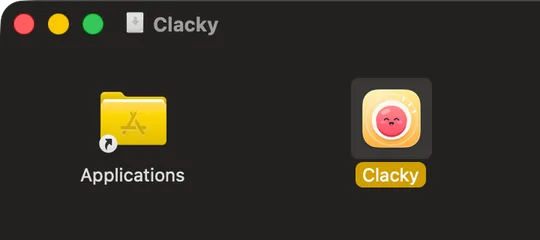
Open & follow Boop
Open Clacky. If macOS says it was downloaded from the Internet, click Open. Boop plays your first click and switches on the tools you pick. Your 7 free days start here.
What you get, free for 7 days
Everything. Not a lite version, not a demo.
-
Hear
- Click sounds, 37 of them
- Keyboard sounds
- Scroll ticks
- Your week, as a share card
-
Show & record
- Click ripples and spotlight
- Screen recorder with mic and camera bubble
- Auto captions and a teleprompter
- GIFs and vertical clips
- Screenshot studio: arrows, blur, frames
-
Mac & focus
- Mac health, storage and battery
- Modes and the notch
- Focus timer with ambient sounds
- Keep awake
- Notes and today’s tasks
-
Build
- Agent alerts for Claude Code and Codex
- Voice to prompt
- MCP: let your AI tools use Clacky
-
Everyday
- Window snapping
- Clipboard history
- Text expander
- Colour picker
- App uninstaller
- Menu bar tidy
After 7 days: Clacky goes quiet and Boop gets hungry until you pick a plan: $4.99 a month, or Lifetime for $19.99 once. Right now, the last 25 lifetime licences go at the old price, $4.99 once. Every plan: every tool and every update, on 2 Macs. Already bought Clacky? You have Lifetime.